




 Whitman Expo
CDN Public API V2 Usage Guide
Interested in using the CDN Greysheet API?
Cdn Public Collector's Pricing Guide (CPG) API V2 Documentation
Overview
The CDN Public API provides programmatic access to Greysheet's comprehensive pricing data and catalog information for coins and currency. This API allows your applications to retrieve real-time pricing information, browse our catalog structure, and access detailed collectible data directly from our databases.
Cost: the cost to use the CDN-Greysheet API is inexpensive and can be reviewed on our API pricing page.
📋 API Terms of Use
Before using the CDN Public API, please review and agree to our API Terms of Use and License Agreement. By accessing the API, you agree to be bound by these terms.
What Can You Do With the API?
- Access Pricing Data: Retrieve current market values including CPG, Greysheet, NGC, and CAC pricing
- Browse Catalog Structure: Navigate through our organized hierarchy of coin and currency categories
- Retrieve Collectible Details: Get specific information about individual coins and currency items
- Integrate with Your Systems: Build custom applications that leverage our pricing and catalog data
- X-Ref other Catalogs: Our catalog has many cross-references to other industry standards like PCGS#, NGCID, Krause, Friedberg, and Pick.
Getting Started - Prerequisites
Before you can start using the CDN Public API, you'll need to complete the following steps:
1. Subscription Requirements
- A dealer level subscription (Currency Dealer, Coin Dealer Digital or Coin Dealer minimum) is required to access the API.
- Your subscription level determines which API tier (Basic or Advanced) you can use.
- Visit our Subscription Plans page to purchase the appropriate subscription level for your needs
- Review the subscription access options to determine which level provides the data you require
- API Pricing is billed separately from your regular subscription and is based on actual usage. For detailed API pricing information, visit API Pricing
2. Obtaining API Credentials
API credentials can be managed here: API Credentials
3. API Tiers: Basic vs Advanced
The CDN Public API offers two tiers to match different data access needs. Your subscription determines which tier you can access:
Subscription Requirements for API Access
- Basic API Access: Requires Coin Dealer Digital or Coin Dealer subscription
- Advanced API Access: Requires Dealer+ or Pro subscription
Which API Tier Should I Use?
- If you have access to the Advanced API and you need more than basic catalog information, use the Advanced API
- If you need more than retail pricing, use the Advanced API
-
The API endpoint doesn't change. To use the Advanced API, simply add
apiLevel=advancedto your API request
4. Test Your Integration
Before going live with your integration:
- Use the development environment for testing: https://cpgpublicapiv2beta.greysheet.com/api
-
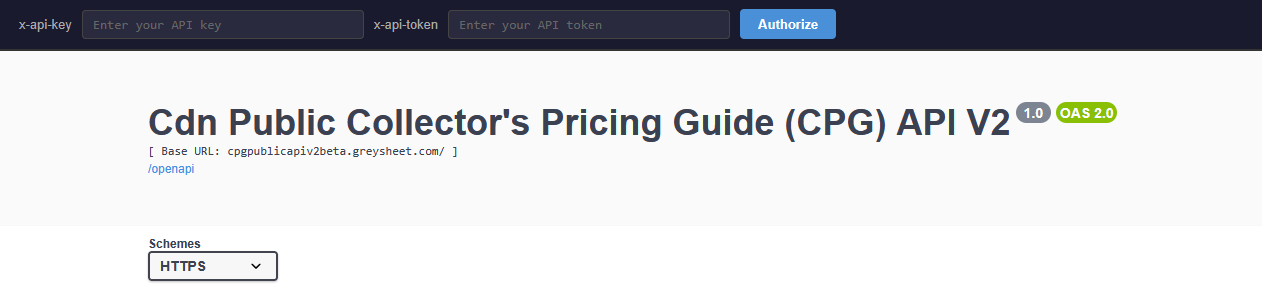
Access the interactive API sandbox at: https://cpgpublicapiv2beta.greysheet.com/swagger-ui
-
Authentication headers are entered at the top of the page:
-
Authentication headers are entered at the top of the page:
- Verify your data access matches your subscription level
- Test all required endpoints before moving to production
5. Move to Production
Once testing is complete:
- Update your application to use the production endpoint: https://cpgpublicapiv2.greysheet.com/api
- Use your production API credentials (not the sandbox token)
- Monitor your usage and ensure proper error handling
Using the API
The CDN Public API is a RESTful API with endpoints located at:
- Development: https://cpgpublicapiv2beta.greysheet.com/api
- Production: https://cpgpublicapiv2.greysheet.com/api
Authentication
All API calls require the following authentication headers to be passed:
x-api-token: Your unique API tokenx-api-key: Your API key
Postman Headers Example:

API Documentation and Testing
Interactive API documentation and testing is available via Swagger:
- https://cpgpublicapiv2beta.greysheet.com/swagger-ui
-
To test the API calls, click the Authorize button and use this token:
Y2RuZGV2OnNLcFhYU0NmZEFZdG5XNjY= -
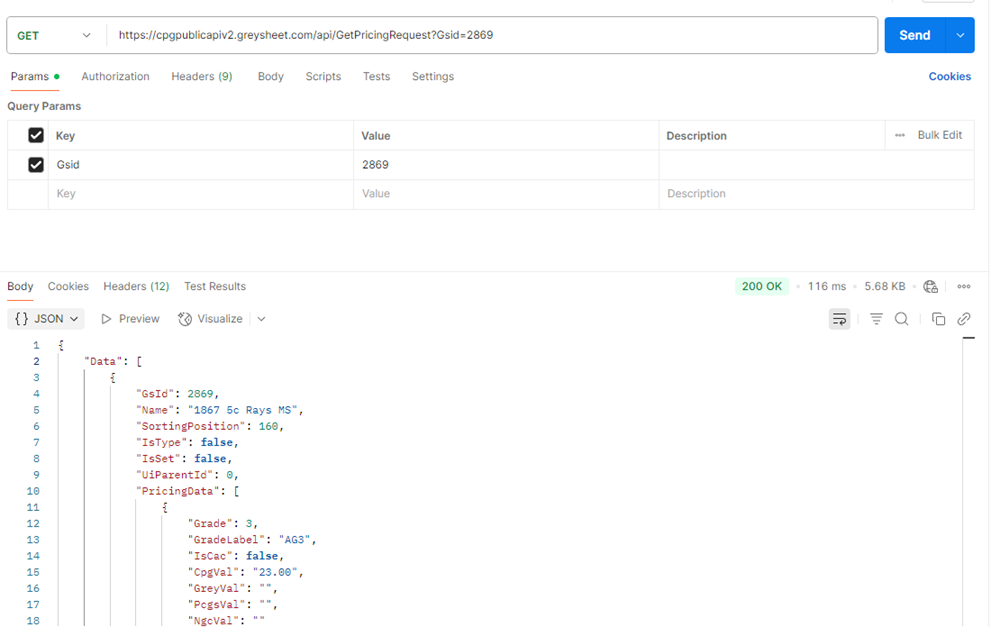
Example endpoint to get a node:
https://cpgpublicapiv2.greysheet.com/api/GetNodeRequest?NodeId=1
Postman API Call Example:
The Catalog Structure
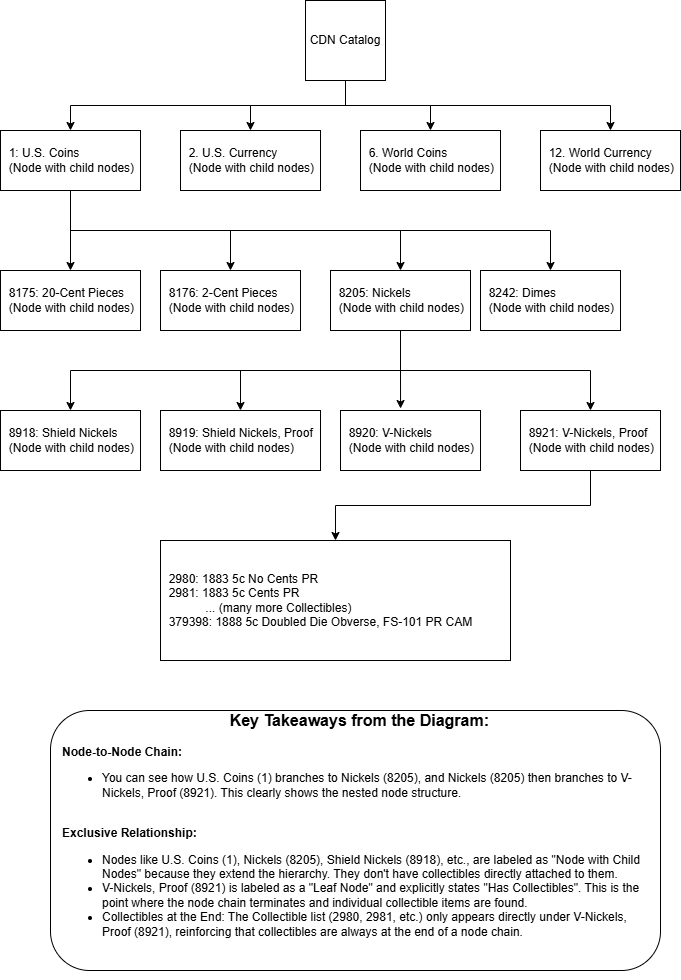
At its core, our catalog system is built on two main types of entities: Nodes and Collectibles.
1. Nodes: Your Organizational Folders
- What they are: Think of Nodes as your organizational categories or folders. They're designed to help you navigate and drill down into very specific types of items.
- How they connect: Nodes form a hierarchy or a chain. This means one node can contain other nodes, creating a nested structure. For instance, "U.S. Coins" (a node) might contain "Nickels" (another node), which in turn might contain "V-Nickels, Proof" (yet another node).
- The Rule: A crucial rule for nodes is that they can either have child nodes (more subfolders) OR they can have child collectibles (the actual items), but never both. This keeps the structure clean and predictable. If a node has child nodes, its only job is to lead you deeper into the category structure.
2. Collectibles: Your Actual Items
- What they are: Collectibles are the individual items in our catalog—the actual coins, currency, or other specific items you'd find.
- Where they live: Collectibles always appear at the end of a node chain . This means you'll only find collectibles associated with a node that doesn't have any further sub-nodes. We call these "leaf nodes" because they are the last branch before the items. Each leaf node can contain multiple collectibles.
3. What Is Included
Advanced API tier is required for full catalog data access. Basic API tier provides limited catalog data, while Advanced API tier provides comprehensive coverage of all nodes and collectibles in our system.
In a Nutshell:
You start with broad Nodes (like "U.S. Coins"), drill down through more specific Nodes (like "Nickels," then "V-Nickels, Proof"), and only when you reach the very specific, "leaf" node (e.g., "V-Nickels, Proof"), do you find the actual Collectibles (like "1883 5c No Cents PR").
This design ensures a clear path to every collectible and maintains a structured, easy-to-understand categorization system.
Pricing Structure
This section outlines the data transfer objects (DTOs) used to represent and convey pricing information within the system, specifically focusing on how data is structured for display or transfer.
CdnPricingDataDto
The CdnPricingDataDto class serves as a container for a collection of pricing items
related to a specific entity, such as a coin series, type, or set. It encapsulates metadata about the pricing data
itself, allowing for structured organization and presentation.
Properties
-
GsId(long): A unique identifier for the specific entity (e.g., a coin series or type) to which this pricing data belongs. -
Name(string): The human-readable name of the entity being priced (e.g., "Lincoln Cents," "V-Nickels, Proof"). -
SortingPosition(int): An integer indicating the desired display order or sorting position for this pricing data within a larger list. -
IsType(bool): A flag indicating if the pricing data represents a general coin type (e.g., "Dimes"). -
IsSet(bool): A flag indicating if the pricing data pertains to a specific set of items (e.g., "Proof Set 1964"). -
UiParentId(long): An identifier pointing to the parent UI element or category, useful for hierarchical display in user interfaces. -
PricingData(List): A collection of individual pricing entries, where each entry typically represents a specific grade or variation of the item.
CdnPricingItemDto
The CdnPricingItemDto class represents a single, specific pricing entry for an item at a
particular grade and condition. It holds various price points from different sources.
Properties
-
Grade(int): The numeric grade of the item (e.g., 65, 70). -
GradeLabel(string): The textual label for the grade (e.g., "MS65", "PR70"). -
IsCac(bool): A flag indicating if the item has a CAC (Certified Acceptance Corporation) sticker. -
CpgVal(string): The CPG (Coin Price Guide) value for the item at this grade. -
GreyVal1 (string): The Greysheet value for the item at this grade. -
PcgsVal1 (string): The PCGS (Professional Coin Grading Service) price guide value. -
NgcVal1 (string): The NGC (Numismatic Guaranty Corporation) price guide value. -
BlueBookVal1 (string): The Blue Book value for the item at this grade.
1 Available with Advanced API tier
Common Use Cases
Retail Pricing Applications
Retrieve current market prices to display in your point-of-sale system or website
Portfolio Management Tools
Access comprehensive pricing data to value coin collections and track market trends
Market Analysis Software
Pull historical and current pricing data for market analysis and reporting
E-commerce Integration
Display real-time pricing on your online marketplace or auction platform
Getting Help
API Key Issues
For API key requests, regeneration, access level upgrades, and technical implementation questions, visit API Credentials
General Support
For subscription or billing questions, visit our support page or contact customer service
Legal
Review the API Terms of Use and License Agreement for information about permitted uses, restrictions, and licensing terms.
Download the Greysheet app for access to pricing, news, events and your subscriptions.
Visit these great CDN Sponsors





Please sign in or register to leave a comment.
Your identity will be restricted to first name/last initial, or a user ID you create.
Comment